How to Replay the AI Agent Run That Did Something Odd Last Night
An agent ran overnight on a batch of tasks. In the morning one result is wrong. It filed a ticket under the wrong customer, or summarised a document it never fetched, or called a tool twice. You run the agent on the same task to see what happened, and it does the job perfectly.
That’s normal for agents. The model’s answers vary from run to run, so the agent picks different tools in a different order and ends up somewhere else. Running it again doesn’t show you last night’s run. It shows you a new one. With an ordinary program, rerunning is how you debug. With an agent, the only copy of the run that went wrong is whatever you kept at the time.
So keep it at the time. Run the agent under CodeInstances wherever it does real work, whether that’s production or a staging setup that looks like it, one instance per task:
codeinstances record -o runs/task-1841.instance -env AGENT_MODE -- python3 agent.py --task 1841
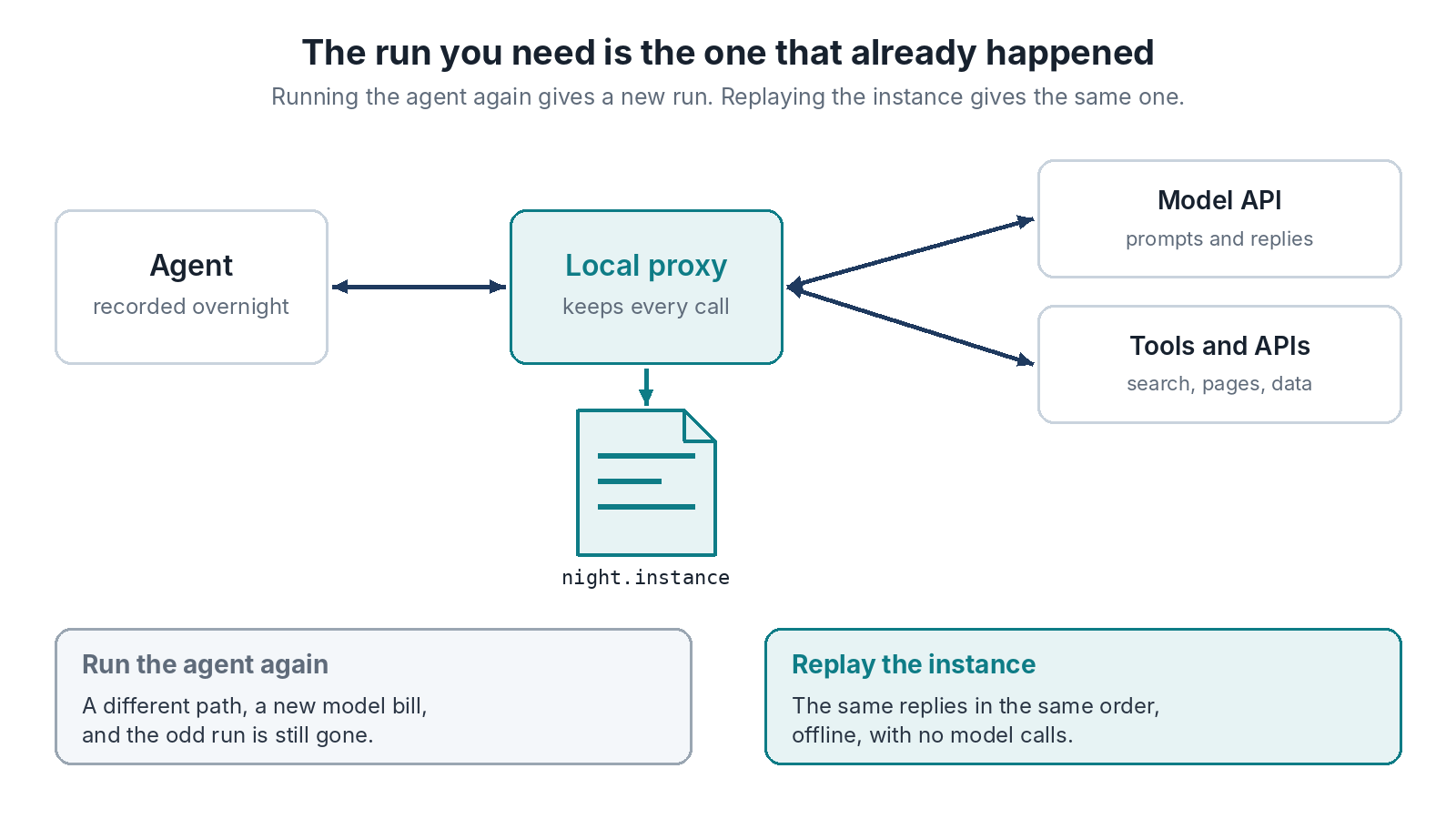
The model API is reached over HTTPS, so its replies are kept in the instance like any other answer: the prompt the agent sent, and what the model said back. So are the search results, the pages it fetched and the APIs it called. -env keeps named environment variables and sets them again on replay. Leave out the ones that hold keys, since the environment isn’t kept unless you ask, and the model key normally travels in a header that’s redacted anyway.
The Same Run, Offline, at No Model Cost
In the morning, take the instance for the task that went wrong and replay it:
codeinstances replay runs/task-1841.instance
The agent gets the same model replies in the same order, so it makes the same choices and walks the same path, every time you run it. Nothing goes to the model, so the replays cost nothing and work with the network off. Add logging, attach a debugger, step through the moment it picked the wrong tool.
When you change the agent (a new prompt template, a fix in a tool, a stricter check), replay the run against the new code with -- python3 agent.py --task 1841. If the change makes the agent send a different prompt, the report says that request isn’t in the recording. That’s the exact point where the new version stops following last night’s run, and it’s usually what you wanted to know.
Limits That Matter for Agents
Streaming model responses are buffered whole in v0.1.0, so on replay a streamed reply reaches the agent all at once. That’s fine for most agent code and wrong for code that reacts token by token. Agents that talk over WebSocket aren’t recorded. In Python or JavaScript the clock and random numbers aren’t captured, so an agent that branches on the time of day may not replay exactly. In Go, the hook package records them (hook.Now(), hook.Intn() and the rest), though exact value replay works for one hooked process at a time. Bodies aren’t redacted, so the prompts and the data in them are in the file. Store agent instances like you’d store logs that hold customer data.
Where This Goes
A kept run is the start of something more. Today each instance carries a SHA-256 id over its contents, so a change made without rewriting the id is caught. Anyone can still change a file and write a new id, so it doesn’t prove who recorded it. Signed, tamper-evident instances are on the project’s plan, as a way to show what an agent was asked, what it was told and what it did. It’s on the plan and isn’t in v0.1.0. For now, what v0.1.0 gives you is the run itself, kept, and replayable.